
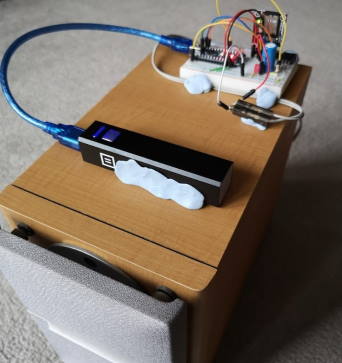
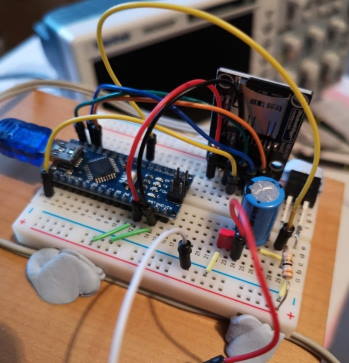
This is a small project to read wav files from a micro SD card via an Arduino Nano and then play them directly to a loudspeaker. I’ll state upfront that this isn’t the easiest way to do this (there are MP3 modules and libraries), but I wanted to:
- Understand sound generation using a microcontroller from first principles
- Have some tools / ideas about how to generate sounds for any future projects
As an idea of the sort of thing I was thinking of - I’ve been thinking of a DIY “ring” doorbell. I already have a camera that can see anyone approaching the front door. A 433.92MHz receiver could detect when the doorbell is pressed (so no new doorbell required). A Raspberry Pi (i.e. the one with the camera) controlling it all and sending and receiving to my mobile phone. A lot more work than just buying a Ring doorbell - but a lot more satisfying!
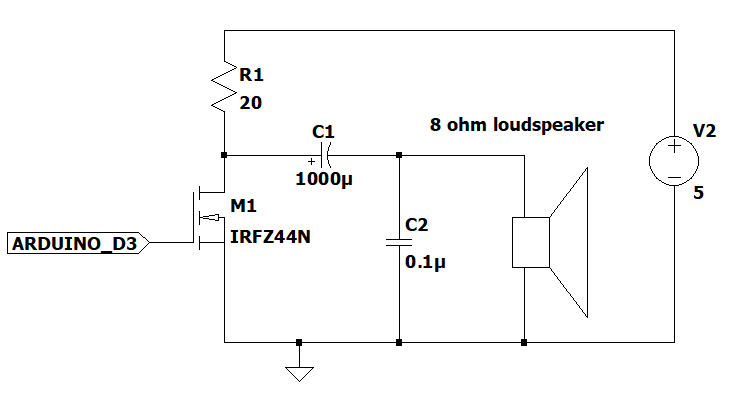
To drive the loudspeaker I used a power MOSFET. Ideally I would use two (or maybe four) MOSFETs in a push pull arrangement. I was more interested in getting the software right however, so I didn’t spend a lot of time getting the hardware correct. [Figure 3 on this page][Class D Audio Amplifiers] would seem be the ideal solution, but I suspect that if I went down this route it would need four independently controllable PWM inputs - and having given this a bit of thought - I think this would be best done with an FPGA. That’s a project for another day! (but it would be pretty awesome). …or maybe I’ll just buy an audio amplifier module from Aliexpress :)
Hardware:
…and an SD card module for the Arduino. They cost about 50p if you get them directly from China.
I realized early on that PWM was the easiest way to generate the sound - and after some investigation and calculations worked out that I could have 8 bit audio with a PWM running at 62.5KHz (16MHz clock divided by 256).
PWM code (62.5KHz):
| |
The next thing I needed was to play each sample. I probably could do one channel at 44KHz but decided to use 16KHz - which would mean the upper frequency limit would be 8KHz. Nowhere near HiFi, but easily good enough for what I was trying to achieve. So I created an interrupt routine that occurred 16,000 times a second with the following code:
Interrupt code (16KHz):
| |
Every time the interrupt occurs one sample of the WAV file should be sent to the PWM. You can see this in the ISR.
I haven’t included the SD card reading code here (because it’s not the reason for this article), but the entire sketch can be be found [on this github repo][Arduino Code Github Repo].
And this is what it sounds like:
There seems to be lots of noise in the background of both tracks - but it was raining very hard outside when I recorded them - so it might be that.
I created the WAV files using Audacity - 8 bit @ 16,000 samples per second - which works out to about 1 MByte / minute. I’ll be the first to admit it’s not HiFi quality - but it’s not bad considering how it’s being generated (well I think anyway :))
What I learnt#
I did some tests and found that I could read the data from the SD card about 7 times faster than I needed it.
Therefore I should be able to do stereo (although I’m not sure what the point would be) but I would need another PWM channel.